Interfaces
The same agent, the same tools and the same session store are exposed through four surfaces. Pick whichever fits how you work; sessions are shared across them.
Interactive CLI
A readline prompt with history (persisted to ~/.helioai_history), editing and
tab-friendly recall. Each event is rendered as it happens, so you watch the agent resolve
parameters, call tools and produce figures rather than waiting on a spinner.
helioai> solar wind density from ACE in January 2005
helioai> compare MMS and Cluster magnetic field during the 2017-07-11 reconnection event
helioai> superposed epoch analysis of MMS bow-shock crossings — proton density, 2017
Figures open in your OS viewer automatically. Ctrl+D or /quit to leave.
Lines starting with / are commands for the prompt itself and never reach the model:
| Command | Does |
|---|---|
/new |
start a new session; the current one stays in /history |
/history |
list your sessions |
/export |
export the current session as a notebook |
/help |
list these |
/quit |
leave |
When something fails — no key, a local server not started, a key refused — the prompt
prints one line saying what to fix and stays open. HELIOAI_LOG_LEVEL=DEBUG adds the
traceback. Colours are dropped when the output is not a terminal, or with NO_COLOR set.
One-shot
Session management
helioai history              # list past sessions
helioai --resume             # pick one to continue
helioai --session <id>       # continue a specific one
helioai history delete <id>  # drop a session and its workspace
helioai export [prefix]      # export a session as a notebook
helioai profile              # edit your profile in $EDITOR
helioai --version
A prefix that fits several sessions lists them instead of picking one. The profile is a short note the agent reads with every question — your field, the frames and units you prefer, the language to answer in.
Jupyter
Figures render inline; parameter cards and catalog previews render as styled HTML. This is the surface where the reproducible export matters most — you can keep working on the generated code in the same notebook.
Web UI
A three-panel layout: sessions, the conversation with its artifacts (figures with a PDF
download and lightbox, parameter cards grouped under Data used, catalog previews), and a
code panel showing the scripts the agent generated. An activity dock streams tool calls,
sub-agent spawns and figure reviews live over SSE, and the answer itself appears as the
model writes it. Each answer has a copy button, and the last one an Export session as
notebook button. Profile in the sidebar edits the same profile as helioai profile.
The provider selector only offers providers the server has a key for. On a screen narrower than 900 px the sidebar folds into a drawer behind the ☰ button.
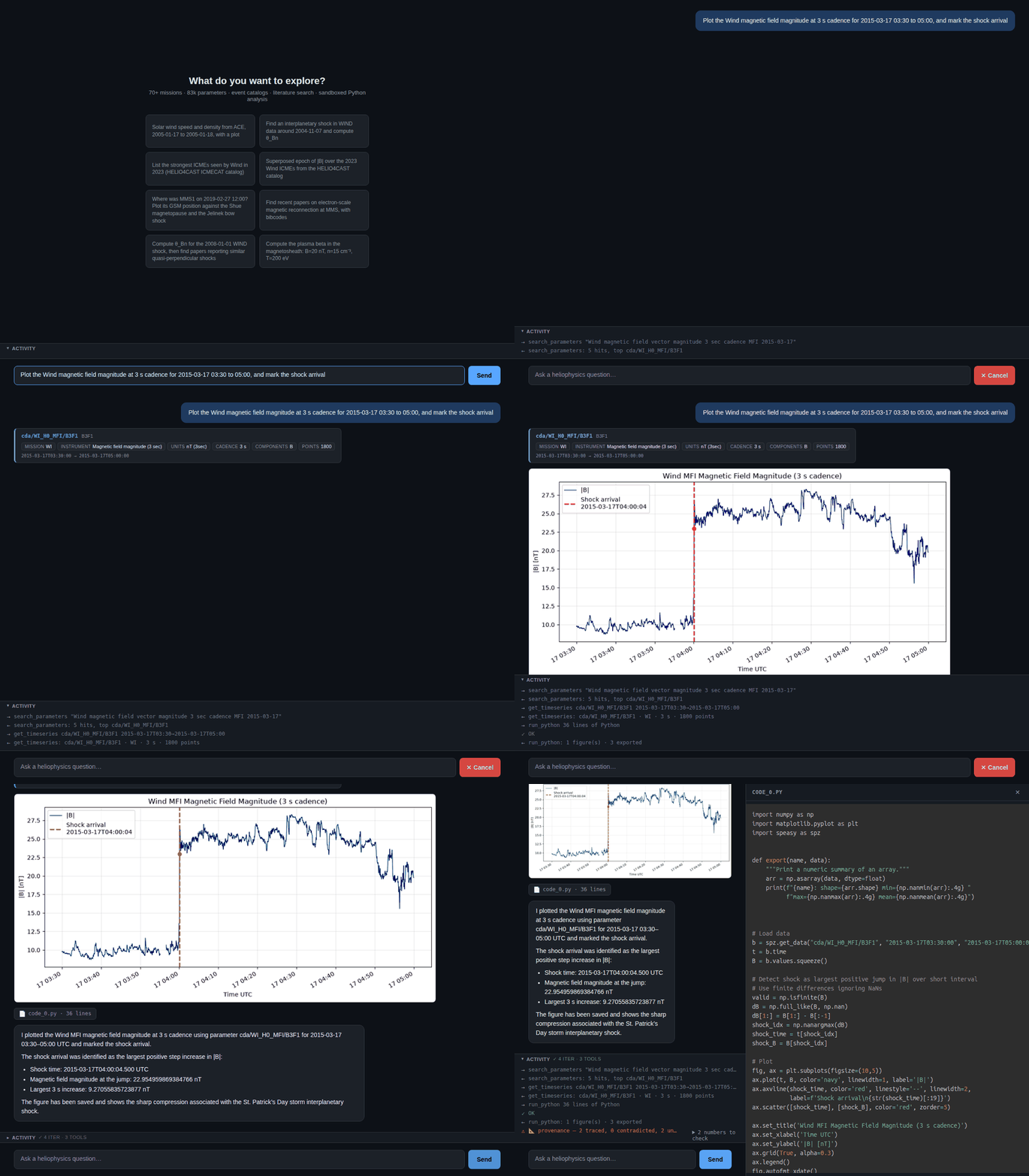
A real session. The sidebar is cropped out; nothing else is edited.
Do not expose this without authentication
run_python executes model-written code. The web UI binds to localhost; on any other
address it refuses to start unless HELIOAI_USERS gives each user a token, which
they then paste into the sidebar's Access token field. Read
SECURITY.md before
putting it on any network.
MCP server
HelioAI exposes its tools over the Model Context Protocol, so any MCP client can drive the heliophysics tooling with its own model. In this mode the client supplies the model, so HelioAI needs no LLM key of its own.
helioai mcp-install prints the configuration for each supported client, with the absolute
path to helioai-mcp resolved for your install — a bare command name fails from a venv,
because the client launches the server from its own working directory.
--write merges the entry into the existing config, keeping any other servers.
Without it the JSON is printed for you to paste.
Codex reads TOML, which has no writer in the standard library, so the block is printed rather than merged — overwriting a config we could not parse would delete working servers.
What the server exposes
Tools — the same 18 the agent uses, from the same registry, so the two surfaces cannot
drift apart. The 15 that change nothing are marked read-only, which is what lets a client
stop prompting for list_missions the way it prompts for run_python.
Prompts — the six analysis skills, which clients surface as slash commands:
/helioai:data_analyst plot IMF Bz for 2015-03-17. Each takes an optional task appended
after the procedure. They remain readable as skill://<name> resources too.
Resources — every recipe as recipe://<name> and every skill as skill://<name>.
Figures — plots from run_python come back inline as images, downscaled, with the
server-side paths kept in the text body for a local client that wants full resolution.
Each connection gets its own workspace under data/users/mcp/, so a download made in one
call is what load_data() finds in the next, and two clients on the same HTTP server do not
write over each other.
What MCP does not carry
Tools called over MCP go straight to the registry, bypassing the agent loop — so the provenance ledger, the recipe-bypass detector and the fabricated-id guard do not run. The answers are the same; the audit trail is not. Reach for the CLI, web UI or Jupyter magic when reproducibility is the point.
Mounting other MCP servers
The reverse also works: HelioAI is an MCP client, so remote tools join its own registry
under an <alias>_ prefix.
HELIOAI_MCP_SERVERS={"alphaxiv": {"command": "npx", "args": ["-y", "mcp-remote", "https://api.alphaxiv.org/mcp/v1"]}}
Both stdio and streamable-HTTP servers are supported; HTTP servers accept a headers
object for authentication. Unreachable servers are logged and skipped rather than fatal.
Choosing between them
| If you want | Use |
|---|---|
| a quick answer, or scripting | CLI one-shot |
| to iterate on an analysis | Jupyter |
| to show someone the reasoning | Web UI |
| HelioAI's tools with your own agent | MCP server |